Back to AdvocateDadCO resources
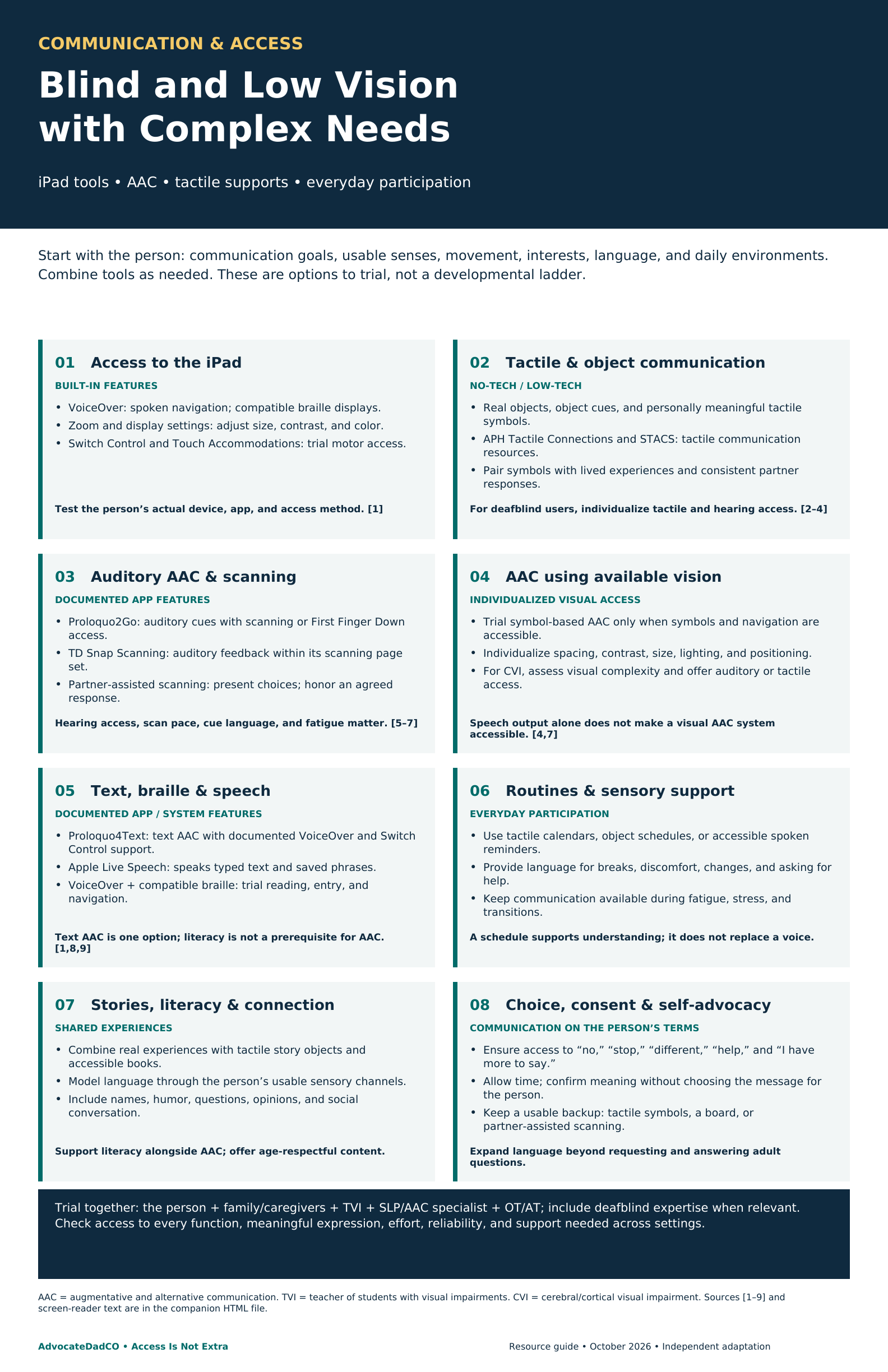
Start with the person: communication goals, usable senses, movement, interests, language, and daily environments. Combine tools as needed. These are options to trial, not a developmental ladder.
AAC means augmentative and alternative communication. This guide addresses communication and participation for children, youth, and adults with additional sensory, motor, developmental, cognitive, or health-related support needs. The eight areas can be combined; their numbering is for navigation, not skill level.
1. Access to the iPad
BUILT-IN FEATURES
- VoiceOver: spoken navigation; compatible braille displays.
- Zoom and display settings: adjust size, contrast, and color.
- Switch Control and Touch Accommodations: trial motor access.
Test the person’s actual device, app, and access method. [1]
2. Tactile & object communication
NO-TECH / LOW-TECH
- Real objects, object cues, and personally meaningful tactile symbols.
- APH Tactile Connections and STACS: tactile communication resources.
- Pair symbols with lived experiences and consistent partner responses.
For deafblind users, individualize tactile and hearing access. [2–4]
3. Auditory AAC & scanning
DOCUMENTED APP FEATURES
- Proloquo2Go: auditory cues with scanning or First Finger Down access.
- TD Snap Scanning: auditory feedback within its scanning page set.
- Partner-assisted scanning: present choices; honor an agreed response.
Hearing access, scan pace, cue language, and fatigue matter. [5–7]
4. AAC using available vision
INDIVIDUALIZED VISUAL ACCESS
- Trial symbol-based AAC only when symbols and navigation are accessible.
- Individualize spacing, contrast, size, lighting, and positioning.
- For CVI, assess visual complexity and offer auditory or tactile access.
Speech output alone does not make a visual AAC system accessible. [4,7]
5. Text, braille & speech
DOCUMENTED APP / SYSTEM FEATURES
- Proloquo4Text: text AAC with documented VoiceOver and Switch Control support.
- Apple Live Speech: speaks typed text and saved phrases.
- VoiceOver + compatible braille: trial reading, entry, and navigation.
Text AAC is one option; literacy is not a prerequisite for AAC. [1,8,9]
6. Routines & sensory support
EVERYDAY PARTICIPATION
- Use tactile calendars, object schedules, or accessible spoken reminders.
- Provide language for breaks, discomfort, changes, and asking for help.
- Keep communication available during fatigue, stress, and transitions.
A schedule supports understanding; it does not replace a voice.
7. Stories, literacy & connection
SHARED EXPERIENCES
- Combine real experiences with tactile story objects and accessible books.
- Model language through the person’s usable sensory channels.
- Include names, humor, questions, opinions, and social conversation.
Support literacy alongside AAC; offer age-respectful content.
8. Choice, consent & self-advocacy
COMMUNICATION ON THE PERSON’S TERMS
- Ensure access to “no,” “stop,” “different,” “help,” and “I have more to say.”
- Allow time; confirm meaning without choosing the message for the person.
- Keep a usable backup: tactile symbols, a board, or partner-assisted scanning.
Expand language beyond requesting and answering adult questions.
Download the chart
Download the printable chart (PDF, 2 pages) · Download the chart image (PNG)
Make the trial meaningful
Trial together: the person + family/caregivers + TVI + SLP/AAC specialist + OT/AT; include deafblind expertise when relevant. Check access to every function, meaningful expression, effort, reliability, and support needed across settings.
Record the access method, environment, message the person chose, assistance provided, effort, and whether the message was understood. Include rejecting a suggestion, repairing a misunderstanding, and creating a message that a partner did not predict. Provide vocabulary and literacy opportunities as access develops; do not require mastery of a small system before offering richer language.
Access notes
Features checked October 6, 2026 against publisher documentation; not independently tested. App features are specific to the named product or page set. Confirm current device requirements, costs, and access before purchase. Eye tracking requires individual assessment; it is not a default solution for vision loss.
Auditory cues and app-specific scanning are different from VoiceOver support. A product’s spoken messages do not establish screen-reader compatibility. For braille users, test the complete app workflow with their own display or input method; general iPad braille support does not certify an app. For deafblind users, auditory scanning may be inaccessible; identify reliable tactile or other personally usable communication channels.
Sources
- Apple — accessibility features
- APH — Tactile Connections
- APH — STACS
- APH ConnectCenter — symbol systems
- AssistiveWare — Proloquo2Go auditory cues
- Tobii Dynavox — TD Snap Scanning
- Perkins — CVI, complex communication needs, and AAC
- AssistiveWare — Proloquo4Text
- Apple — Live Speech on iPad
Terms
TVI: teacher of students with visual impairments. SLP: speech-language pathologist. OT: occupational therapist. AT: assistive technology. CVI: cerebral/cortical visual impairment.